Features

Built around the routes you repeat.

Plan the work, understand the route ahead, stay oriented while moving and learn from what actually happened.

Before the workout

Know what is coming. Choose what you want to do about it.

Trail IQ brings the route, your own comparable history and the intended session together before you start.

Route Memory 2.0

A familiar route becomes personal training context.

Save a route, import earlier workouts or let Trail IQ recognise a familiar path. Comparable efforts of the same activity type build an explainable picture of the route and how you tend to handle it.

  • Stable sections based on terrain and repeated performance changes
  • Best, latest and typical times for familiar routes
  • Multiple recurring slowdowns, strengths, climbs, recoveries and finish patterns
  • A ranked lookahead of the few upcoming moments worth knowing about
  • Personal claims only when enough comparable evidence supports them
  • Conservative guidance for new, partial or reverse route matches
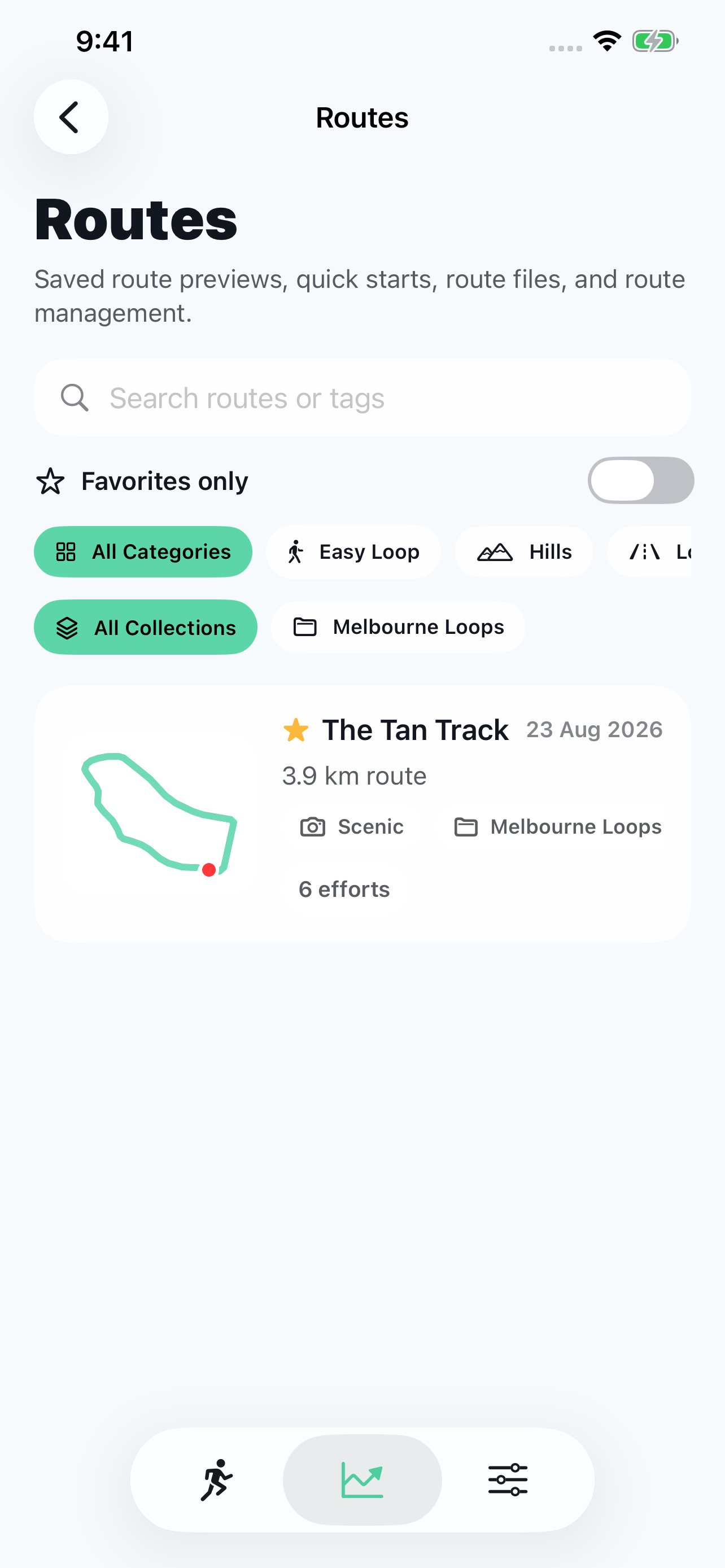
Trail IQ route library showing saved routes and their workout history.

Personal route strategy

A plan for this route, based on your own history.

Choose a familiar route and an effort goal. With enough comparable workouts, Today's Strategy suggests how to open, which sections deserve care and where you have shown room to build.

  • An opening approach matched to today's goal
  • Protect, Hold or Push advice for supported route sections
  • An expected finish range when the evidence supports one
  • A clear definition of success for an easy, steady or hard effort
  • Confidence and a Why this strategy explanation you can inspect

Personal strategy needs at least five comparable same-activity efforts and a selected goal. A new route can still show terrain context while its history grows.

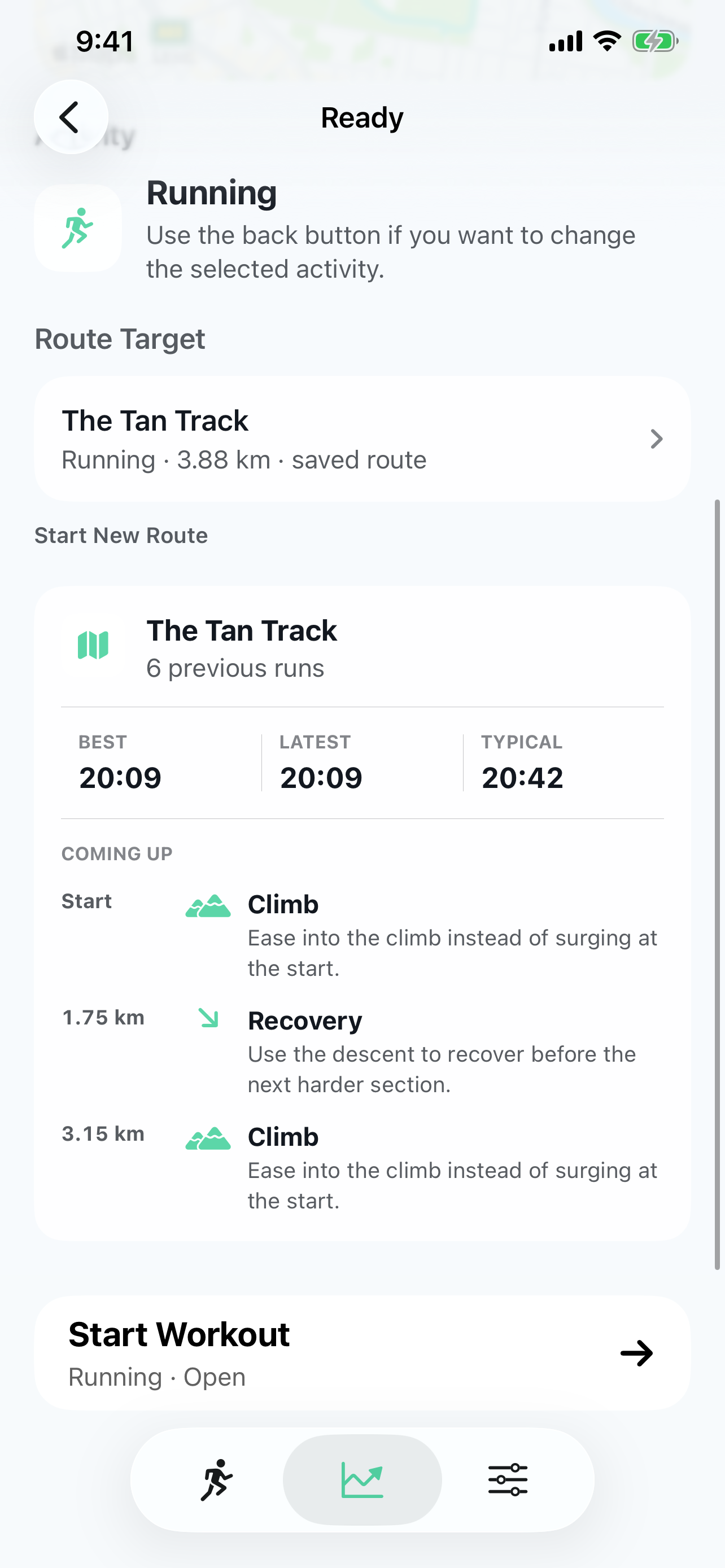
Trail IQ Ready route briefing for The Tan Track, using comparable previous runs.
The route briefing is shown here. Personal strategy adds goal-specific advice when the required evidence is available.

Structured workouts

Give the session a useful shape.

Start with a practical template or build a reusable sequence of warm-up, work, recovery and cool-down steps. The builder stays focused on sessions people can understand and repeat.

  • Quick starts for common easy, tempo and interval sessions
  • Time, distance or manual steps with repeat groups
  • Reorder, duplicate and edit steps without rebuilding the session
  • Pace, speed, heart-rate-zone and cycling-power targets when supported
  • Pause, resume, skip and relaunch-safe step progress
  • Route context can warn that a hard step meets a climb or familiar section
  • The route never silently changes or moves your prescribed workout

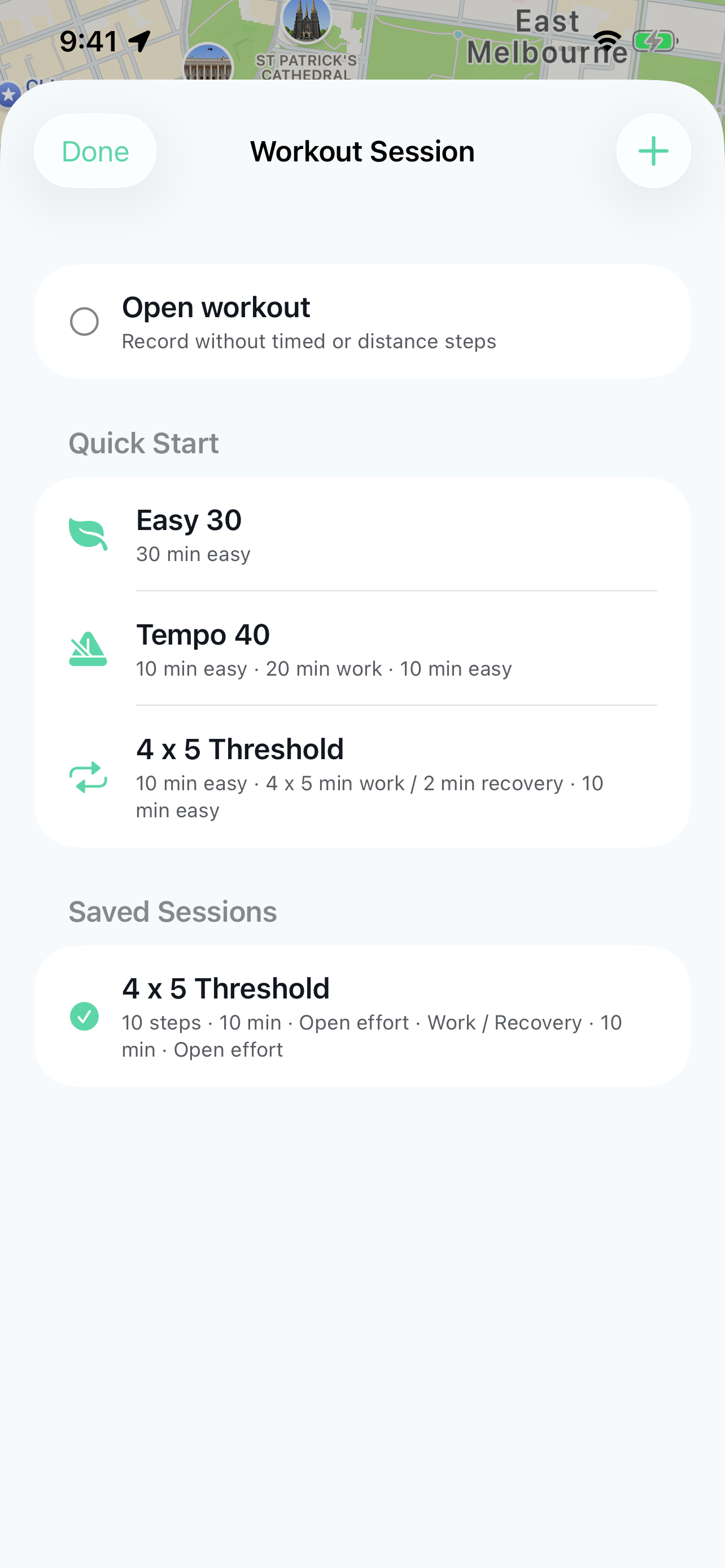
Structured sessions are optional. Turn off Show Session Selector in Workout Setup for a simpler start screen; your saved sessions remain available when you turn it back on.

Trail IQ Workout Session screen with quick starts and saved structured sessions.

Training context

Use the recent picture without a mystery score.

Training Load explains the work behind its label. Optional Recovery Context compares fresh Apple Health signals with your own recent ranges and stays hidden when the evidence is not useful.

  • Seven-day load compared with the preceding 28-day weekly average
  • Workout count, recent hard sessions and time since the last workout
  • Measured heart-rate zones or clearly labelled workout-goal fallback
  • Optional resting heart rate, HRV and sleep against personal baselines
  • Freshness and minimum-history checks for every recovery signal
  • No opaque readiness score or medical assessment
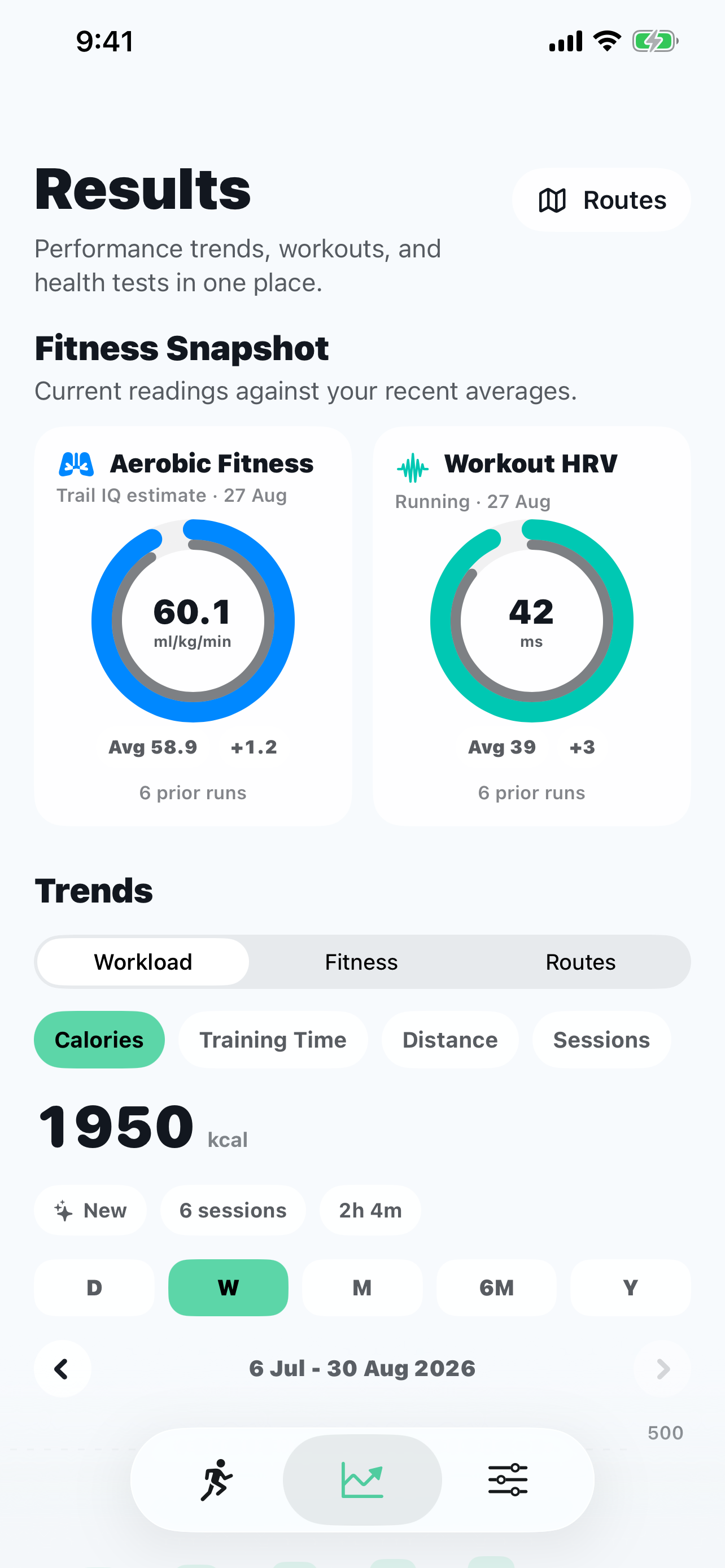
Trail IQ Results screen showing aligned fitness snapshot donuts and workload trends.

During the workout

Keep the next useful thing in view.

Live information is prioritised around the route, the current session step and the data that is genuinely available.

Practical navigation

Know where you are and what remains.

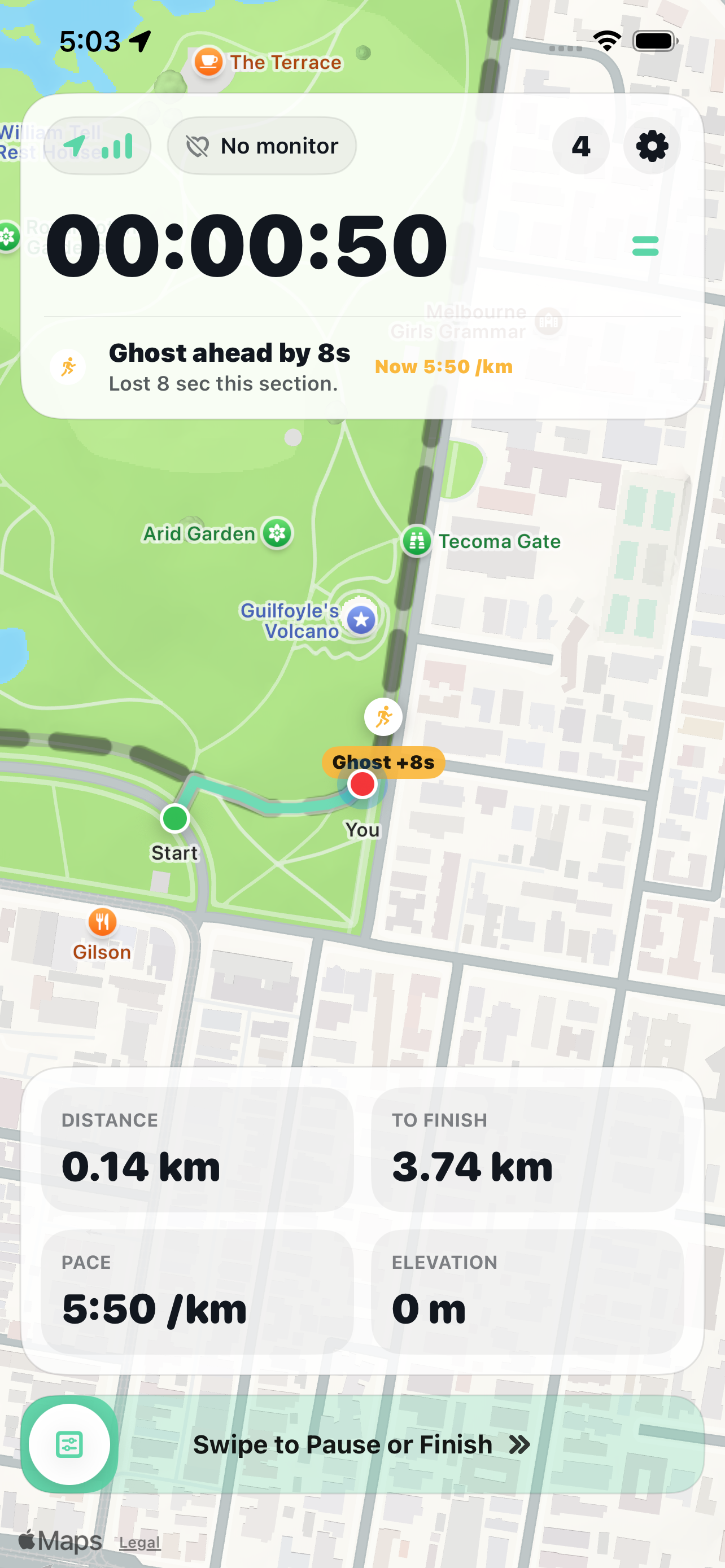
The map-first workout screen uses one direction-aware route position for progress, remaining work and finish detection.

  • Distance and ascent remaining on an assigned route
  • Elevation profile with current route progress
  • The next meaningful bend without pretending to provide road navigation
  • Off-route distance and a restrained direction for rejoining ahead
  • Automatic finish only after credible progress through the finish area
  • A clear confirmation when automatic finish saves the workout
Trail IQ live workout following a real route with distance remaining.

Route-aware coaching

Hear the most useful supported message.

Trail IQ can combine what is ahead, how your stronger efforts handled it and how today is unfolding. Optional speech turns a supported Protect, Hold or Push recommendation into a short action. When personal evidence is weak, it falls back to a neutral route fact or stays quiet.

  • Route fact, personal history or current-execution context according to evidence
  • Section cues ranked by importance and proximity
  • Personal strategy adapts to reliable route progress and fresh effort data
  • Easy-day guidance protects the intended effort instead of chasing a faster time
  • Structured-step cues take priority when messages would collide
  • Effort corrections and off-route warnings take priority over routine strategy advice
  • Stable cooldown and deduplication prevent repeated announcements
  • Distinct haptics, tones and optional short spoken guidance
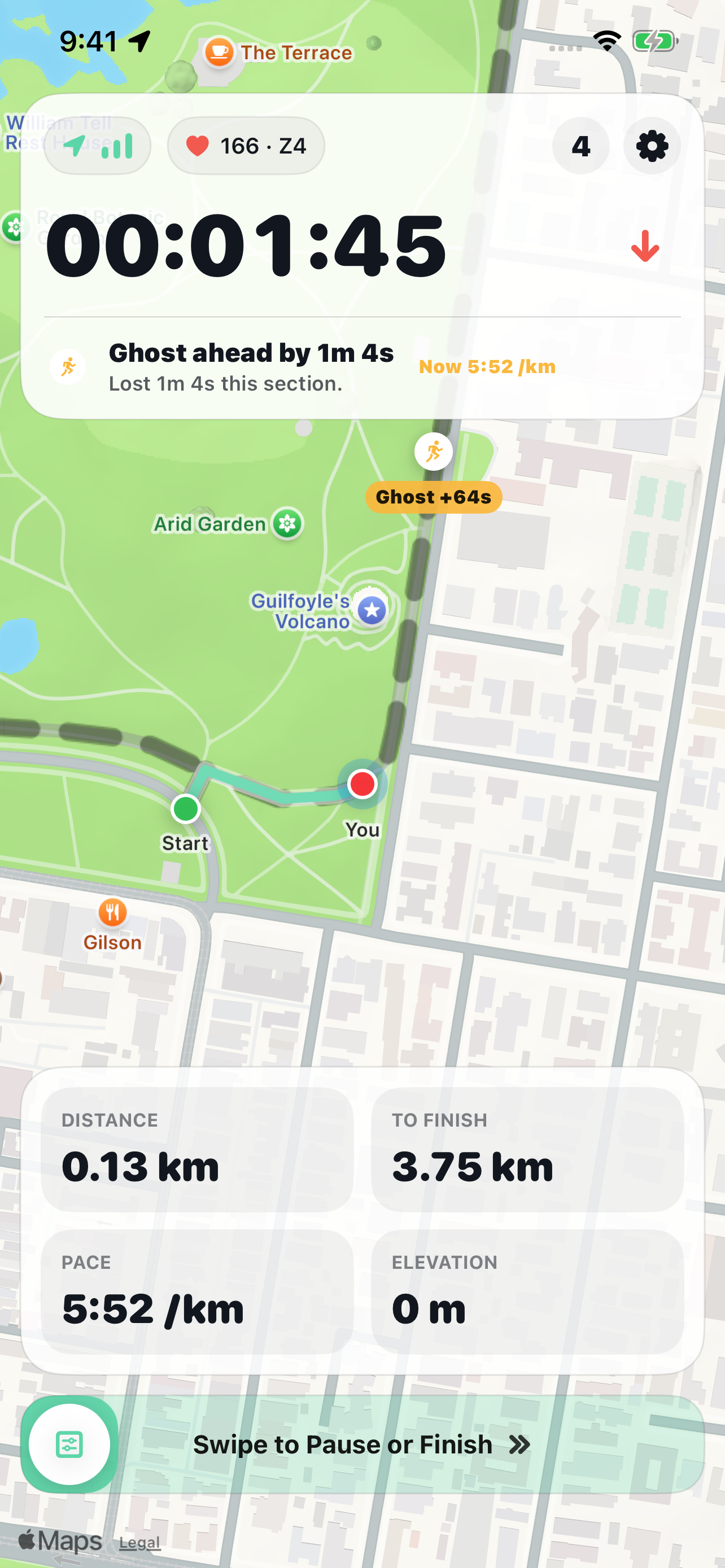
  • Live Ghost remains optional and independent of saved route comparison
Trail IQ live workout with an optional Ghost comparison on a real route.

Choose your reference

Your fastest effort is not always the right one to follow.

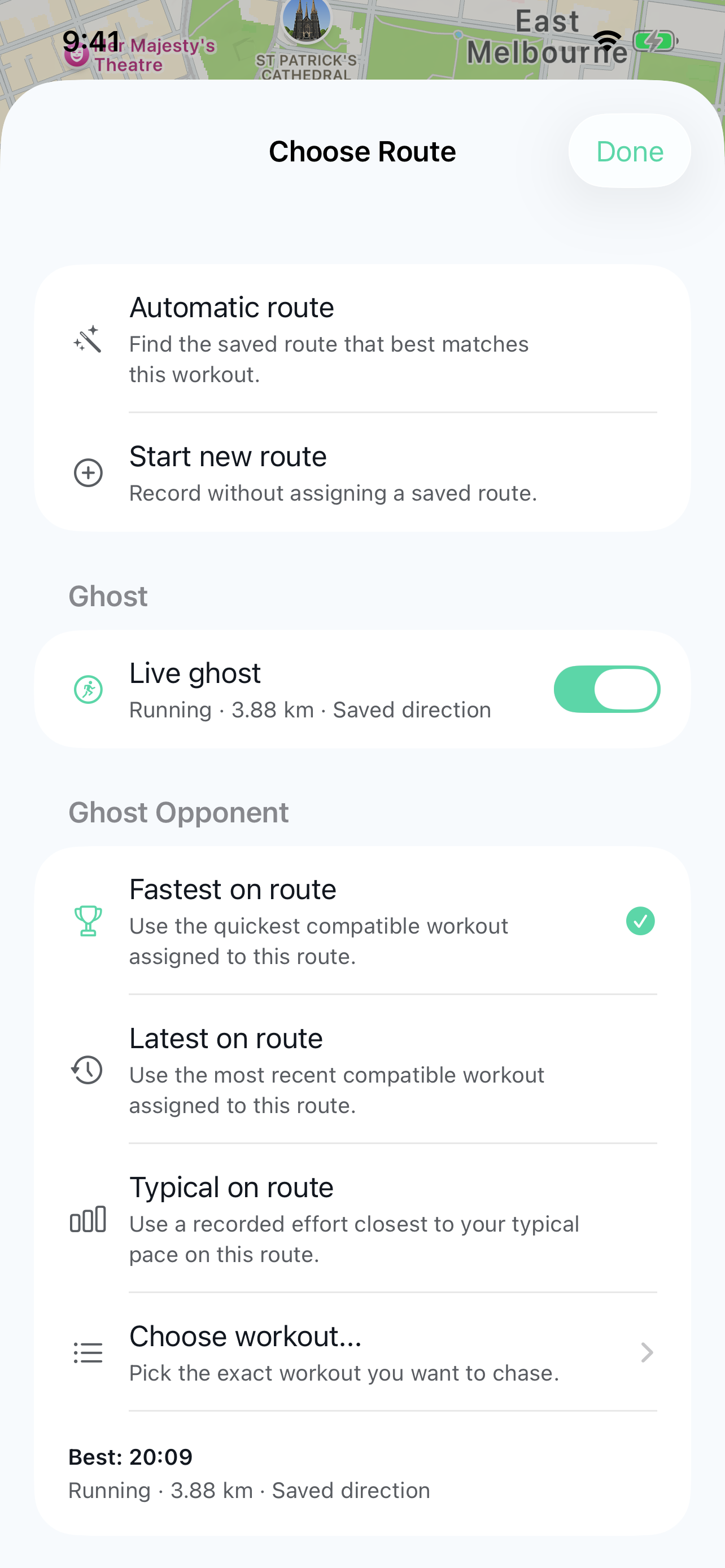
Live Ghost can follow Fastest, Latest or a workout you choose. With enough compatible history, it can also help you practise a more representative or better-controlled effort.

  • Typical selects a real recording close to your median pace, not an invented average workout
  • Best Executed favours goal-matched effort control, a measured heart-rate record and a controlled opening and finish
  • Today's Strategy follows a temporary Generated reference with an expected finish range
  • Options without enough supporting evidence stay hidden
  • A Generated Ghost is never saved as a workout or used as a recorded result baseline

Live Ghost remains optional and independent of saved route comparison. You can leave it off and still compare a completed workout with a matching earlier effort.

Trail IQ Ghost picker showing available recorded references, including Typical on route.
Only references supported by the selected route and available history are offered.
Heart rate Effort that has a real source

Compatible Bluetooth monitors add live zones, heart-rate goals and Workout HRV when beat-to-beat intervals exist.

Cycling Speed, cadence and power

Compatible standard Bluetooth sensors add capability-aware tiles, reconnect states and stored source details. Wheel distance requires your circumference; power zones require your FTP.

Running Cadence from iPhone Motion

Supported iPhones can add live cadence and active steps. Trail IQ does not infer cadence from GPS or invent stride data.

After the workout

See the answer first. Understand where it came from.

The result gives you a complete summary, focused reports and a short debrief based on the strongest available evidence.

Workout Result

A complete summary without repeated statistics.

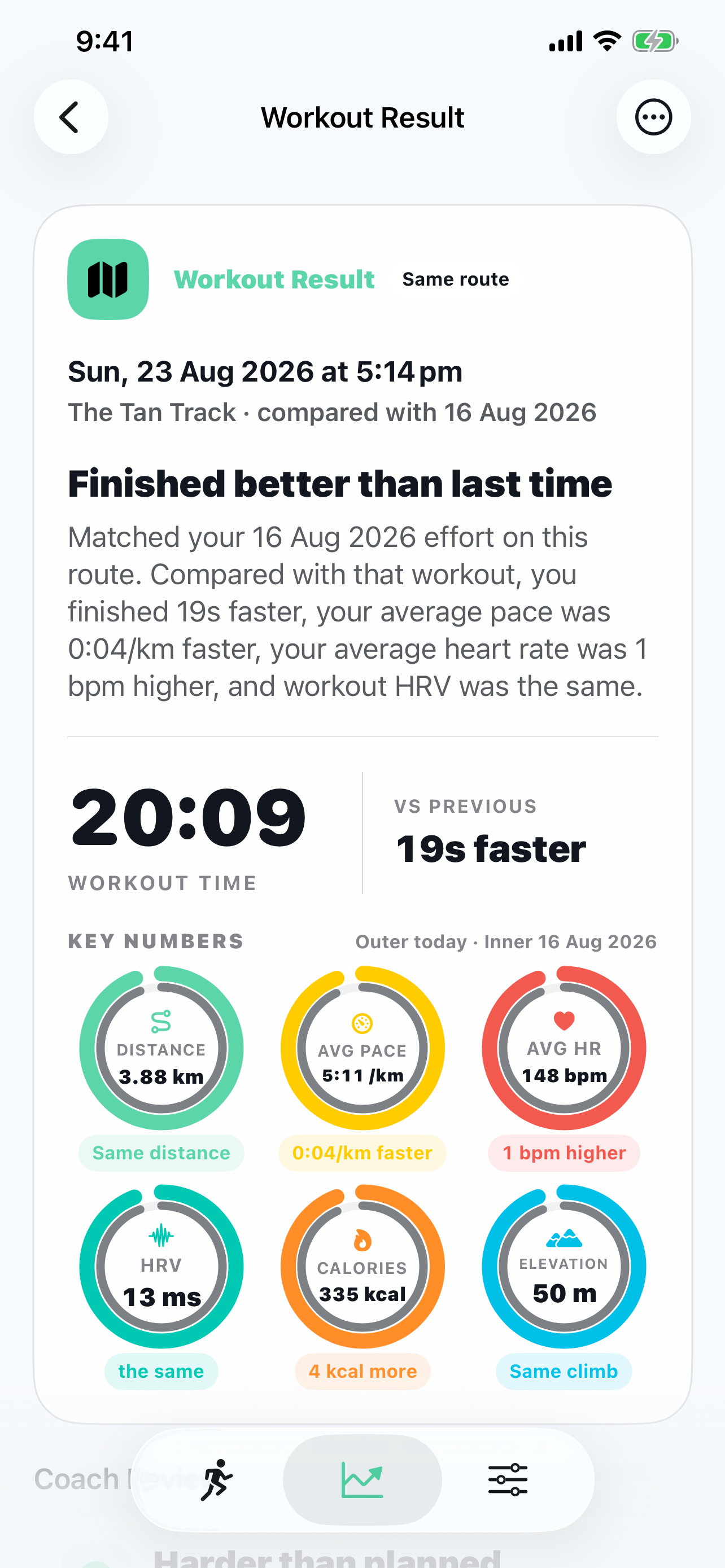
The headline identifies the workout and route outcome. Concentric comparison rings put today on the coloured outer ring and the matching prior effort on the grey inner ring. Each deeper report answers a different question.

  • Complete key numbers including distance, pace or speed, heart rate, HRV, calories and elevation when available
  • Coach Review with supported evidence and a practical next-workout action
  • Pace & Splits or Speed & Splits for execution, baseline split markers and recorded cadence
  • Effort & Heart Rate for zones, the selected goal range, drift and Workout HRV
  • Terrain & Conditions for elevation and available weather context
  • Unavailable reports and metrics remain hidden instead of appearing blank
Trail IQ Workout Result with a same-route outcome and complete key metrics.

Route debrief

Explain the result through the route.

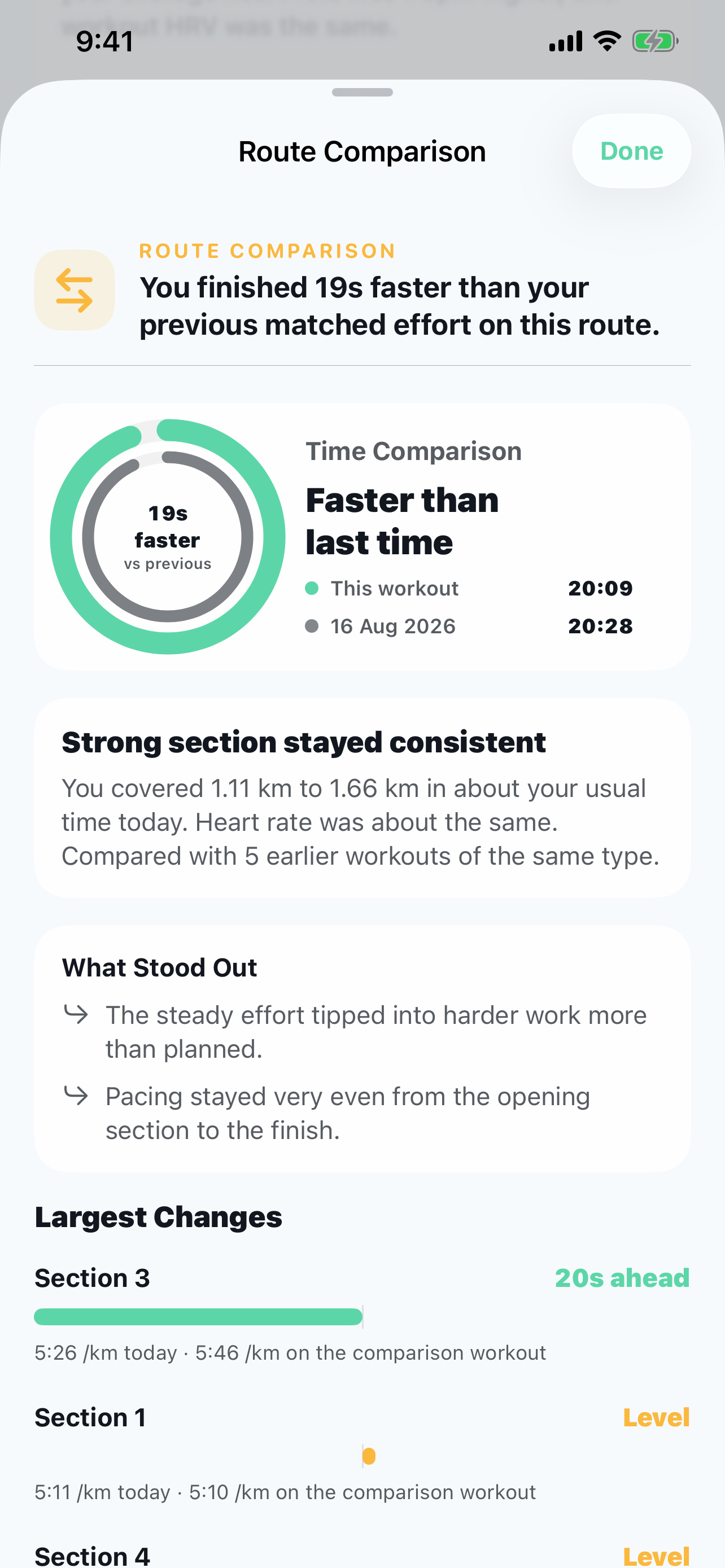
On a comparable familiar route, Trail IQ ranks a handful of meaningful observations instead of dumping every detected change onto the screen.

  • Overall time and pace or speed against the chosen matching baseline
  • Where time was gained or lost across stable route sections
  • How today handled known slowdowns, strengths, climbs and finishes
  • Careful effort interpretation only when both workouts support it
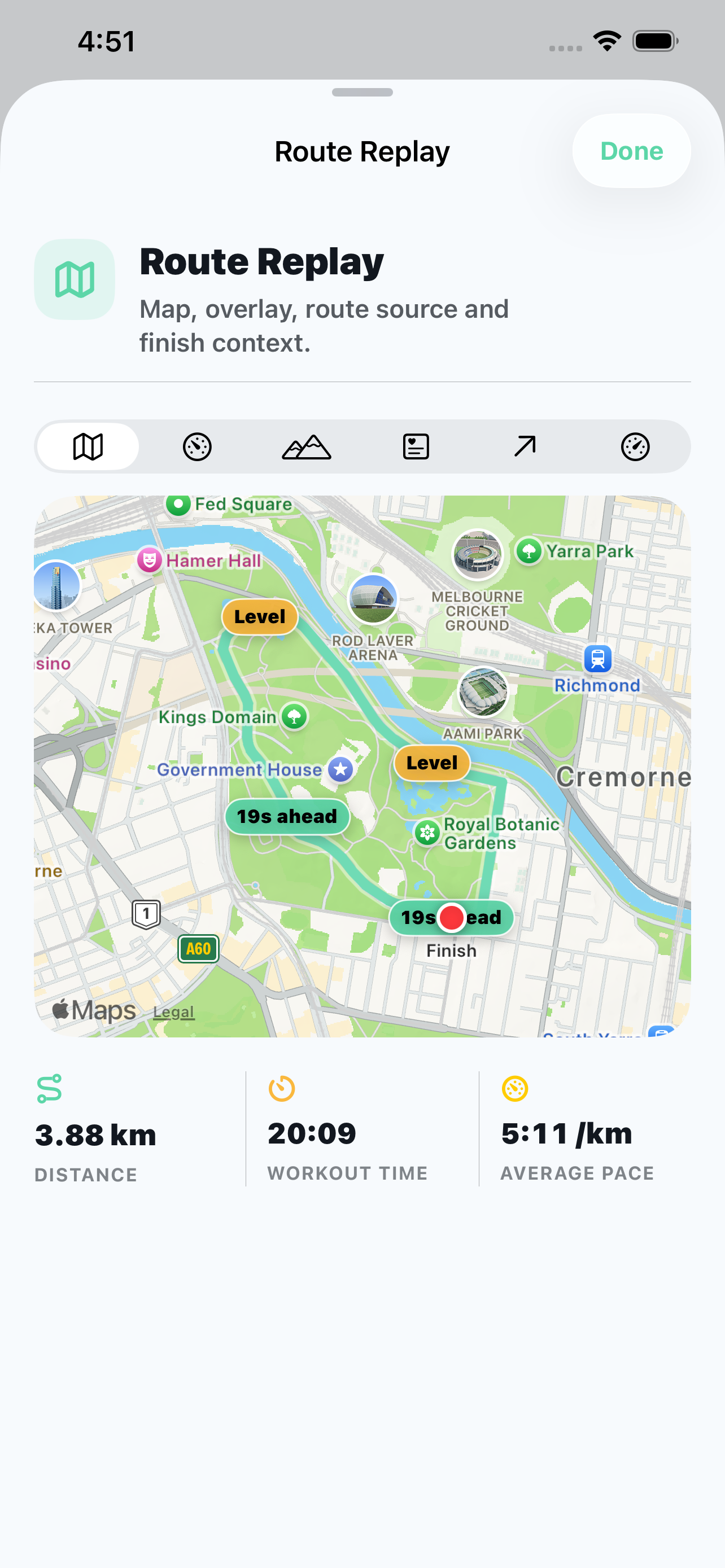
  • Route Story replay with route, pace, heart-rate and elevation overlays when available
  • Qualified wording where an observation is useful but not causal
Trail IQ Route Story explaining overall and section-level changes.
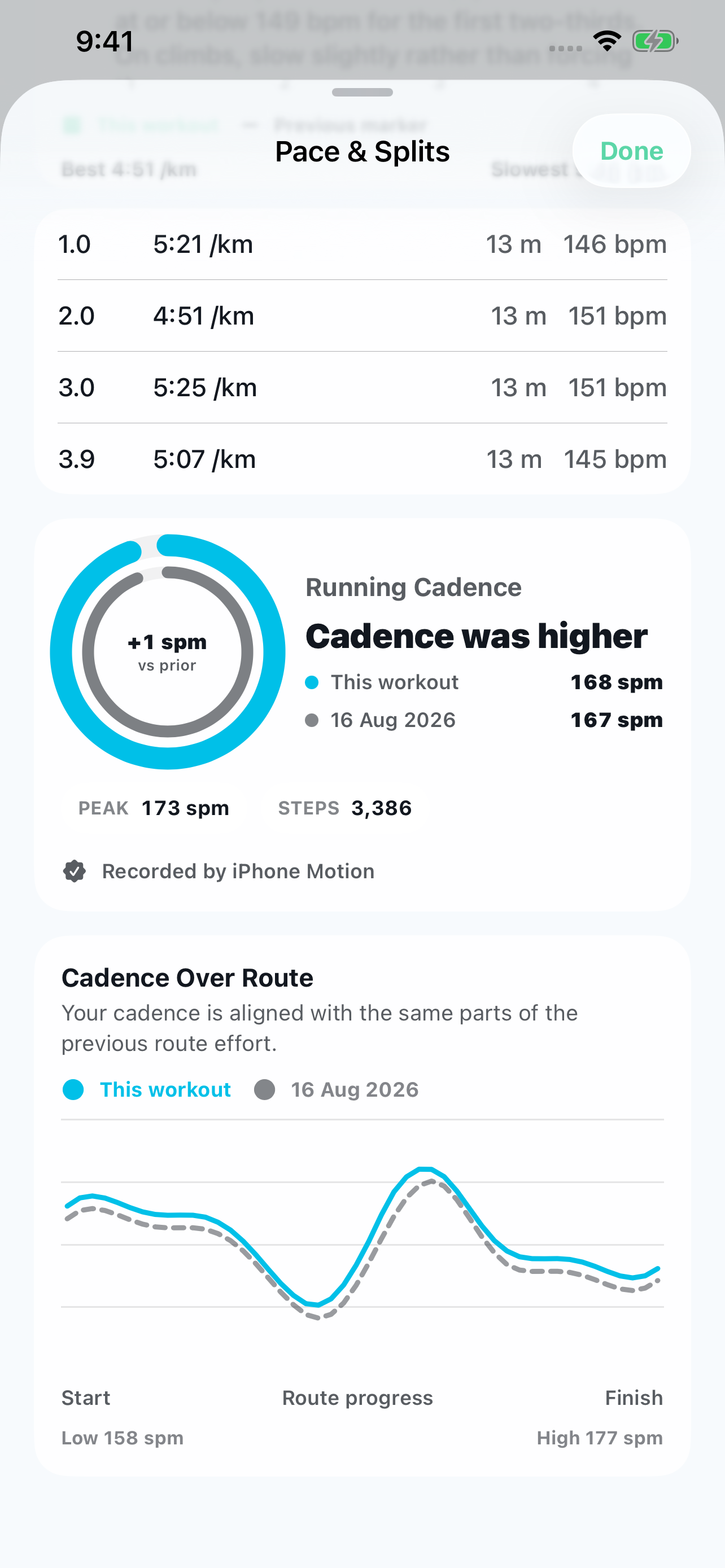
Running cadence compared with a prior run using concentric rings and cadence over route progress.

Cadence on the same route

Compare average steps per minute and see how cadence changed along each run. Peak cadence, active steps and iPhone Motion source remain together.

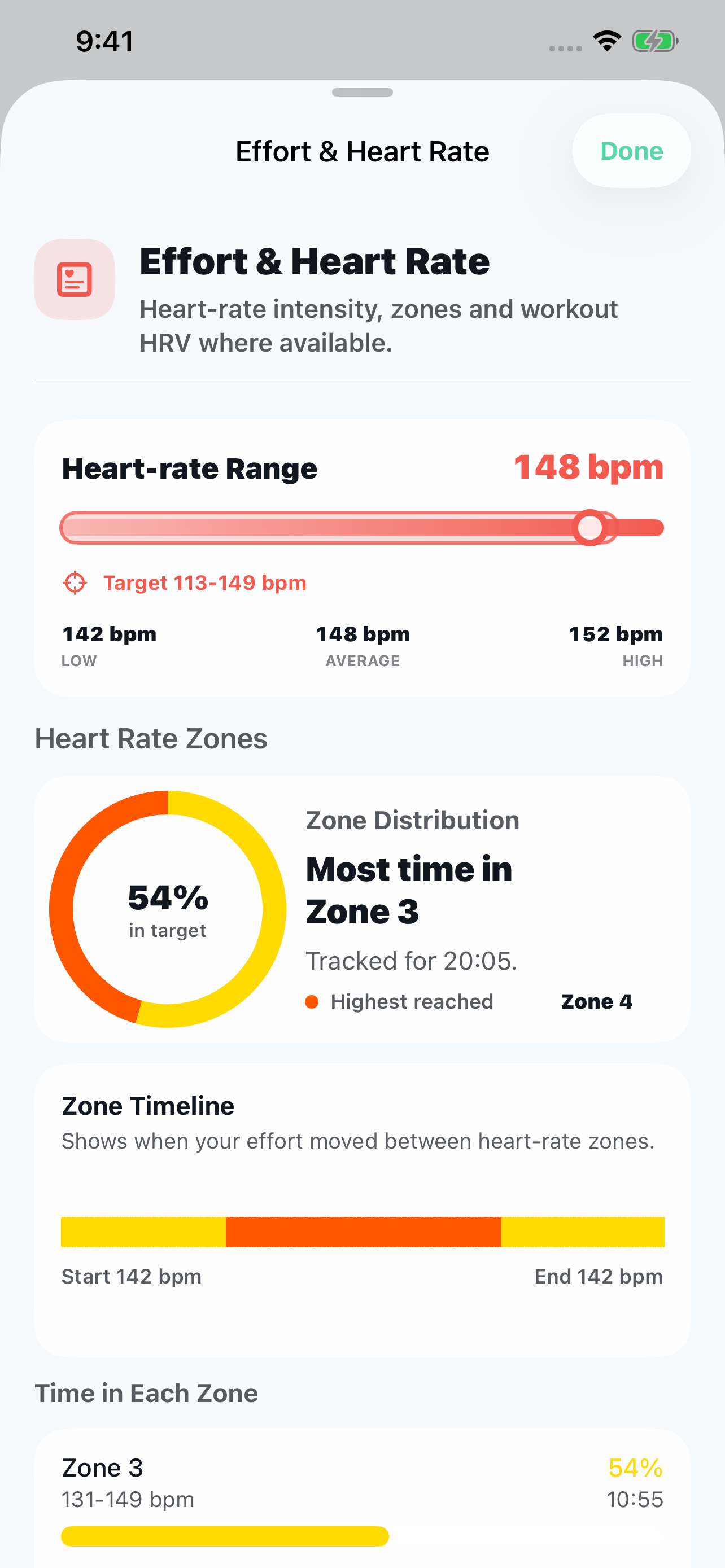
Trail IQ heart-rate range with the selected effort target highlighted and a zone distribution donut.

Effort against your goal

A highlighted target on the range rail and heart-rate chart puts the recorded effort beside the range you selected.

Trail IQ Route Story showing the time comparison with an earlier run before section-level changes.

Time, then the sections

Read the overall route comparison first, then follow the gap chart and section changes to understand where the result came from.

Your history, under your control

Bring useful data in. Take useful data out.

Portability is explicit and user initiated, with workout files kept separate from full Trail IQ backups.

Import, export and backup

Build history without locking it in.

  • Import GPX, TCX, FIT and supported Adidas Running exports
  • Check for duplicates and enrich an existing workout when the new source is more complete
  • Discover familiar routes from imported route geometry
  • Share an individual completed workout as GPX or TCX
  • Use separate local backup, restore and deletion controls for Trail IQ data
  • Choose Apple Health permissions, import and export independently
Trail IQ Route Story replay showing the real Tan Track route and its time comparison.

Local-first

Your training history belongs to you.

Workout, route, sensor, structured-session, health-test, profile and comparison data is processed and stored on your device. Apple Health and WeatherKit are optional Apple services used only for the features you enable.

No Trail IQ account
No third-party advertising
No cross-app tracking
Local export and restore tools